
ROS Melodic/DashingをインストールしてたUbuntu 18.04のGPU搭載ノートPCを20.04にアップグレードしたので手順をメモしておきます。
環境
- ThinkPad T480s
- CPU: Core i7-8650U
- GPU: GeForce MX150
GPUのドライバはPPA (Personal Package Archives)のものをインストールしています。
 Launchpad
手順
OSを更新
ソフトウェアアップデートを先に済ませておきます。
sudo apt updatesudo apt upgradesudo apt install update-manager-coreソフトウェアアップデートの設定を "LTS" にしておきます。
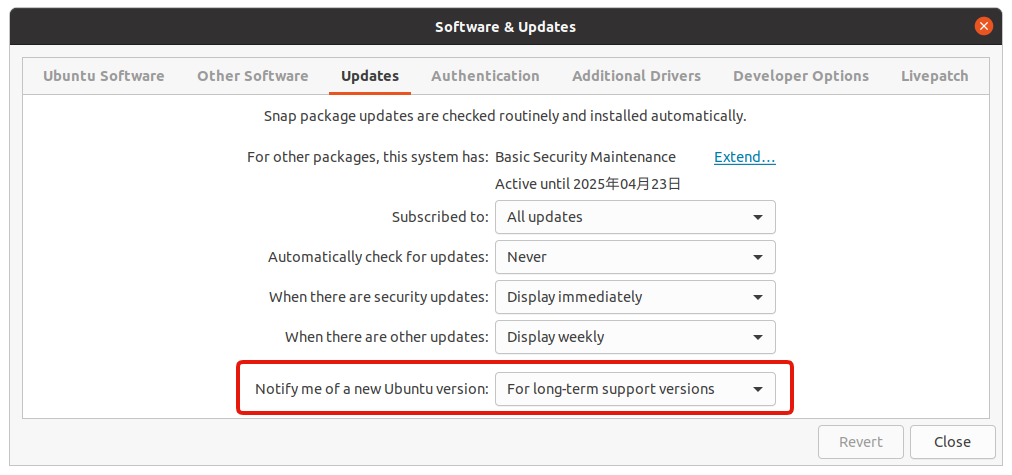
$ cat /etc/update-manager/release-upgrades# Default behavior for the release upgrader.
[DEFAULT]# Default prompting and upgrade behavior, valid options:##  never  - Never check for, or allow upgrading to, a new release.#  normal - Check to see if a new release is available.  If more than one new#           release is found, the release upgrader will attempt to upgrade to#           the supported release that immediately succeeds the#           currently-running release.#  lts    - Check to see if a new LTS release is available.  The upgrader#           will attempt to upgrade to the first LTS release available after#           the currently-running one.  Note that if this option is used and#           the currently-running release is not itself an LTS release the#           upgrader will assume prompt was meant to be normal.Prompt=lts
ROSを削除し、ディストリビューション更新にあわせてパッケージを更新、そして使わないパッケージを削除します。
sudo apt remove "ros-*"sudo apt dist-upgradesudo apt autoremoveディストリビューションを更新します。
sudo do-release-upgrade再起動を促されるので再起動します。
aptのデータ参照元定義(sources.list)を更新
do-release-upgrade の途中でコメントアウトされたものを確認します。これらを1つずつ修正して apt update ができるかを確認します。
$ grep "focal" /etc/apt/sources.list.d/*/etc/apt/sources.list.d/danielrichter2007-ubuntu-grub-customizer-bionic.list:# deb http://ppa.launchpad.net/danielrichter2007/grub-customizer/ubuntu focal main # disabled on upgrade to focal/etc/apt/sources.list.d/docker.list: deb [arch=amd64] https://download.docker.com/linux/ubuntu focal stable # disabled on upgrade to focal/etc/apt/sources.list.d/graphics-drivers-ubuntu-ppa-bionic.list:# deb http://ppa.launchpad.net/graphics-drivers/ppa/ubuntu focal main # disabled on upgrade to focal/etc/apt/sources.list.d/gyazo_gyazo-for-linux.list:# deb https://packagecloud.io/gyazo/gyazo-for-linux/ubuntu/ focal main # disabled on upgrade to focal/etc/apt/sources.list.d/gyazo_gyazo-for-linux.list:# deb-src https://packagecloud.io/gyazo/gyazo-for-linux/ubuntu/ focal main # disabled on upgrade to focal/etc/apt/sources.list.d/nvidia-docker.list:# deb https://nvidia.github.io/libnvidia-container/stable/ubuntu18.04/$(ARCH) / # disabled on upgrade to focal/etc/apt/sources.list.d/nvidia-docker.list:# deb https://nvidia.github.io/nvidia-container-runtime/ubuntu18.04/$(ARCH) / # disabled on upgrade to focal/etc/apt/sources.list.d/nvidia-docker.list:# deb https://nvidia.github.io/nvidia-docker/ubuntu18.04/$(ARCH) / # disabled on upgrade to focal/etc/apt/sources.list.d/ubuntu-ja.list:# deb http://archive.ubuntulinux.jp/ubuntu focal main # disabled on upgrade to focal/etc/apt/sources.list.d/ubuntu-ja.list:# deb-src http://archive.ubuntulinux.jp/ubuntu focal main # disabled on upgrade to focal/etc/apt/sources.list.d/ubuntu-ja.list:# deb http://archive.ubuntulinux.jp/ubuntu-ja-non-free focal multiverse # disabled on upgrade to focal/etc/apt/sources.list.d/ubuntu-ja.list:# deb-src http://archive.ubuntulinux.jp/ubuntu-ja-non-free focal multiverse # disabled on upgrade to focal/etc/apt/sources.list.d/vscode.list:# deb [arch=amd64,arm64,armhf] http://packages.microsoft.com/repos/code stable main # disabled on upgrade to focalついでにサードパーティ製のソフトウェアでリポジトリ鍵が必要なものについて、apt-key コマンドでGPG公開鍵を追加していたものについてはインストール方法が変わっているはずなので確認しておきます。
たとえばROS 2の /etc/apt/sources.list.d/ros2-latest.list についてはドキュメントの更新内容にあわせて以下のように修正しました。
deb [arch=amd64] http://packages.ros.org/ros2/ubuntu bionic maindeb [arch=amd64 signed-by=/usr/share/keyrings/ros-archive-keyring.gpg] http://packages.ros.org/ros2/ubuntu bionic main同様にしてDockerもドキュメントが修正されているので sources.list もそれに合わせて修正します。
apt-key コマンドが非推奨となった件は以下の記事が詳しいです。

メモ
CUDAドライバについて
$ dpkg -l | grep nvidia- でドライバのバージョンを確認したところ、do-release-upgrade 実行後は nvidia-driver-460 (460.91.03-0ubuntu0.18.04.1) が nvidia-driver-460 (460.91.03-0ubuntu0.20.04.1) に入れ替わっていました。
PPAでドライバを追加していたため、自動で合うバージョンがインストールされたのだと思います。
その他
apt autoremove を実行する前に do-release-upgrade を実行すると以下のようなエラーが出ました。
(※ apt autoremove 後に do-release-upgrade を実行したら解決しました)
Could not calculate the upgrade
An unresolvable problem occurred while calculating the upgrade.
 This can be caused by: * Upgrading to a pre-release version of Ubuntu * Running the current pre-release version of Ubuntu * Unofficial software packages not provided by Ubuntu
If none of this applies, then please report this bug using the command 'ubuntu-bug ubuntu-release-upgrader-core' in a terminal.
$ grep Broken /var/log/dist-upgrade/apt.log参考ログ: grep-broken-dist-upgrade-apt.log (Gist)
参考にしたサイト
 ADACHIN SERVER LABO »
 Qiita
Qiita
 Ask Ubuntu
 Super User
 Ubuntu ManpagesUbuntu Manpages
関連記事
- (Updated )Raspberry Pi 3用Ubuntuイメージの作成方法(Server版)Ubuntu MATEのイメージ編集し、Raspberry Piで使いやすくしました。
- (Updated )Raspberry Pi 2にUbuntu 14.04をインストールする方法RaspberryPi2にのUbuntu14.04(Trusty)をインストールしてセットアップまで行ったのでそのメモ。
- (Updated )Raspberry Pi 3上でUbuntu 18.04 + ROS Melodicの動作確認をしましたRaspberry Pi 3上でUbuntu 18.04 + ROS Melodic Morenia(以下、ROS Melodic)の動作確認をしました。
- (Updated )Raspberry Pi 3にUbuntu 14.04をインストールする方法RaspberryPi2までは公式のファームウェアをmicroSDカードに書き込むだけで使えていました(RaspberryPi2にUbuntu14.04をインストールする方法 | Memoteki)が、RaspberryPi3からはそう簡単ではなくなってしまったので対応方法を2種類メモしておきます。
- 2025年6月以降ROS環境でapt-get updateするときにGPG errorが発生する場合の対処方法2025年5月末にROS/ROS 2の署名鍵が期限切れになったことで発生するGPG errorの原因と、公開鍵を差し替えて解消する手順をまとめたメモ。